> For the complete documentation index, see [llms.txt](https://docs.filliquid.io/llms.txt). Markdown versions of documentation pages are available by appending `.md` to page URLs; this page is available as [Markdown](https://docs.filliquid.io/zh/zhi-ya-yong-hu-zhi-nan/ru-he-shi-yong-fit/zhi-ya-fit-zhuan-qu-fig.md).
# 质押FIT 赚取 FIG。
## **📌** FIT 质押指南(赚取 FIG 代币)
**质押 FIT 赚取 FIG 奖励!**��\
*按照本指南,轻松安全地质押 FIT。*
### **1️⃣** FIT 质押概览
* **什么是 FIT?**\
📌 当您存入 FIL 时,系统会发行 FIT 代币(权益证明代币)。\
📌 FIT 代币不仅能产生 FIL 质押收益,还可以在农场中进行质押,额外赚取 FIG 奖励。
* **FIG 奖励**\
✅ FIG 是 Filliquid 的治理代币。\
✅ FIG 奖励根据固定释放规则分配,具体细则可在白皮书中查看。
***
* **PC 版使用指南**
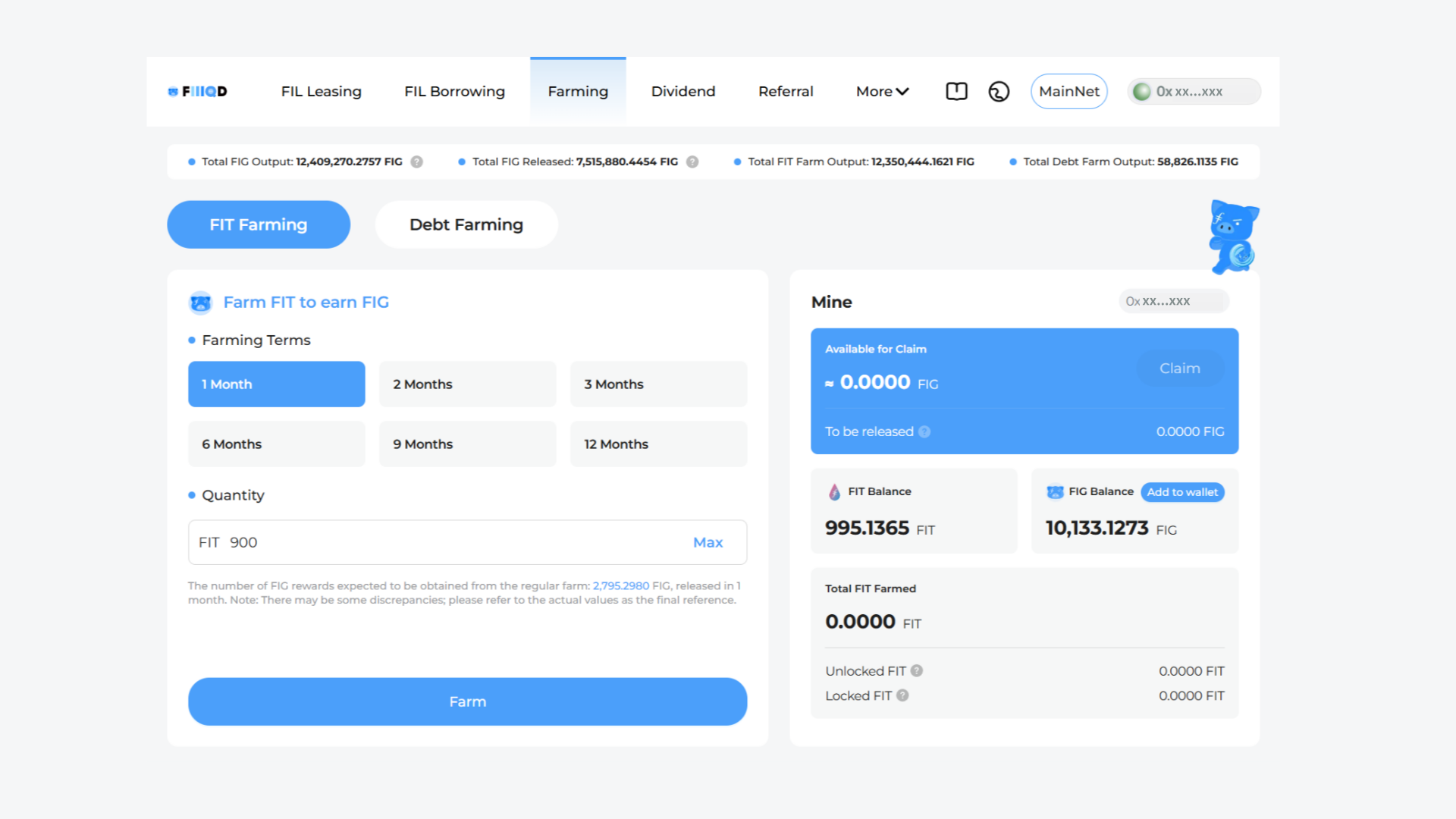 #### **① 打开 FIT 质押面板**
📌 进入 Farming 页面,并打开 **FIT 质押面板**。\
📌 在这里,你可以查看当前的 FIT 余额以及已质押的数量。
#### **②** 输入质押数量
✅ 在文本框中输入你要质押的 FIT 数量。
#### **③** 选择质押周期
✅ 选择你希望的质押(锁定)周期
* 选项范围从 **1 个月到 1 年。**
* **较长的质押周期可获得更高的奖励**。
* 奖励会根据全网总质押量动态调整(详细规则请参考白皮书)。
#### **④** 确认质押
✅ **检查质押详情**,然后点击 **“确认”** 按钮。\
✅ 你的钱包(如 **Metamask、FoxWallet、Burrito Wallet** 等)会弹出确认窗口——**签署交易** 以完成质押。
***
* **移动端操作指南**
#### **① 打开 FIT 质押面板**
📌 进入 Farming 页面,并打开 **FIT 质押面板**。\
📌 在这里,你可以查看当前的 FIT 余额以及已质押的数量。
#### **②** 输入质押数量
✅ 在文本框中输入你要质押的 FIT 数量。
#### **③** 选择质押周期
✅ 选择你希望的质押(锁定)周期
* 选项范围从 **1 个月到 1 年。**
* **较长的质押周期可获得更高的奖励**。
* 奖励会根据全网总质押量动态调整(详细规则请参考白皮书)。
#### **④** 确认质押
✅ **检查质押详情**,然后点击 **“确认”** 按钮。\
✅ 你的钱包(如 **Metamask、FoxWallet、Burrito Wallet** 等)会弹出确认窗口——**签署交易** 以完成质押。
***
* **移动端操作指南**
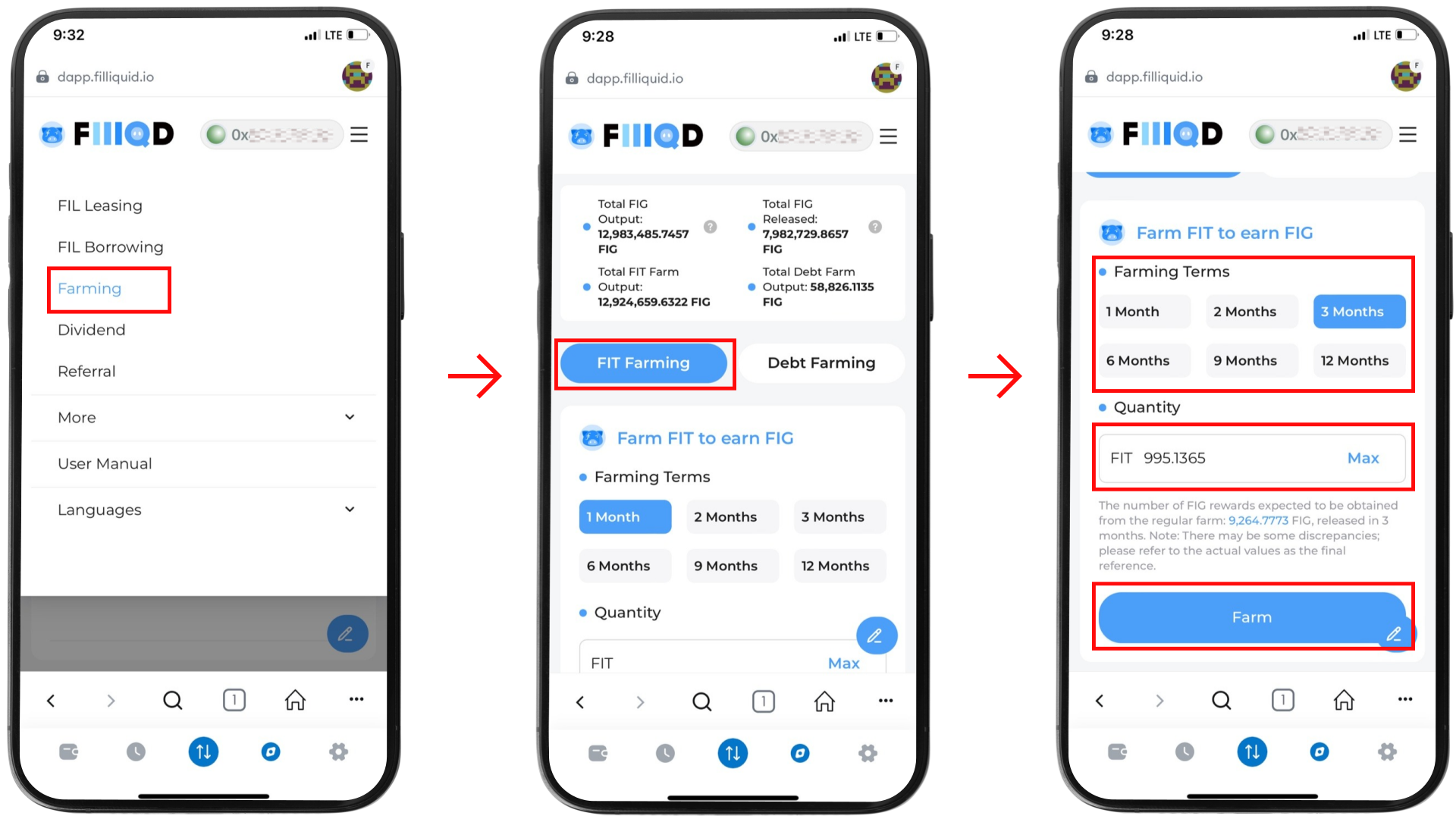 1️⃣ 点击右上角的 **菜单按钮**(☰),选择 **“农场”**。\
2️⃣ 选择 **FIT 农场**。\
3️⃣ 设定**质押周期**,并输入从存入 Filecoin 获得的 **FIT 数量**。\
4️⃣ **查看预计 FIG 挖矿奖励**,然后点击 **“确认”** 按钮。
✅ 质押完成后,你可以在页面底部查看 **质押记录**。
***
**📌 质押流程总结**
✔️ **存入 FIL** → **获得 FIT 代币** → **质押 FIT** → **赚取 FIG 奖励**\
✔️ **质押时间越长,收益越高**\
**✔️ 奖励率会根据全网总质押量波动**\
**✔️ 奖励分配规则请参考白皮书**
💡 **选择适合你的锁定周期,最大化 FIG 奖励!🚀**
1️⃣ 点击右上角的 **菜单按钮**(☰),选择 **“农场”**。\
2️⃣ 选择 **FIT 农场**。\
3️⃣ 设定**质押周期**,并输入从存入 Filecoin 获得的 **FIT 数量**。\
4️⃣ **查看预计 FIG 挖矿奖励**,然后点击 **“确认”** 按钮。
✅ 质押完成后,你可以在页面底部查看 **质押记录**。
***
**📌 质押流程总结**
✔️ **存入 FIL** → **获得 FIT 代币** → **质押 FIT** → **赚取 FIG 奖励**\
✔️ **质押时间越长,收益越高**\
**✔️ 奖励率会根据全网总质押量波动**\
**✔️ 奖励分配规则请参考白皮书**
💡 **选择适合你的锁定周期,最大化 FIG 奖励!🚀**